
For marketing operations
Know the stack works before anyone asks.
Every morning Gane reads your analytics, ads and CRM and checks the tracking that ties them together. When a tag, a form or a connection breaks, you hear about it with the evidence, and the action closes once the fix shows in the data.
Your first actions in minutes. Then 30 days of Team, free, with no card.
| Audit | Reads | Status | Open actions |
|---|---|---|---|
| Tracking and connections | |||
| Connections that stopped syncing | Your connections | Running | 0 |
| Conversions falling while spend holds | Google Ads | Running | 1 |
| Contacts from ads that Google Ads doesn’t count | Google Ads, Google Analytics | Running | 0 |
| Tracking that undercounts | Google Analytics, Google Ads | Running | 1 |
| Accounts and follow-up | |||
| Inquiries no one has contacted | HubSpot | Running | 0 |
| AI answers | |||
| AI crawlers in the server logs | Server logs | Waiting on server logs | 0 |
Sample workspace · figures are illustrative
// A week at Ostrow Billing
The week the site release broke two things.
Most breaks aren’t dramatic. A redesign drops a redirect or a tag, and nobody finds out until the pipeline review asks where the demo requests went.
Here’s how the same week goes with Gane checking every morning. Each problem lands with the person who covers it, and each one closes when the data shows it’s fixed.
If a connection had broken instead, such as a Google sign-in that expired, the morning review would say so first. Gane runs that check before any other, because every finding built on a stale source is stale too.
Tuesday, 9:40 pm
Your siteThe new site goes live.
The web team ships a redesign. The demo page moves from /demo to /book-a-demo with no redirect, and the new form doesn’t fire the Google Ads conversion tag. Nothing looks wrong, and the ads keep spending.
Wednesday, early morning
GaneLive ads point at a page that isn’t there.
After the morning sync, Gane opens every page your ads and sitelinks link to. Nine ads and two sitelinks now land on an address that answers 404. The action is marked urgent and goes to Priya, who runs paid, as a Slack message.
What was measured Value Ads linking to /demo 9 Sitelinks linking to /demo 2 What /demo answers 404, not found Fix the page or the links in Google AdsUrgentFix · Paid · PriyaWednesday, 11:15 am
Your teamThe redirect goes in.
Priya asks the web team for a redirect from /demo, and points the two sitelinks at the new page while she’s in the account.
Thursday, early morning
GaneResolvedThe ads action closes on its own.
Gane opens the same pages after the next sync. They answer now, so the action shows Resolved and drops off Priya’s list. Nobody had to remember to close it.
The next Monday, early morning
GaneConversions have stopped while spend holds.
This check compares the last seven days with an average week from the month before, so a tag that broke midweek shows up within days rather than on the first quiet morning. Spend and clicks are steady and conversions have nearly stopped, which points at the tag or the form, not the ads.
Figure Last 7 days Average week Spend $4,210 $4,350 Clicks 618 640 Conversions 4 23 Check the tag, the forms and recent site changes before touching bidsUrgentTracking · Not sized · Marketing opsMonday, 2:30 pm
Your teamThe tag goes back on.
You work through the steps Gane lays out. You check each conversion action’s status in Google Ads, send a test inquiry and watch it count, and look at what changed on the site. Bid changes wait until conversions count again.
That Thursday
GaneResolvedResolved, with the history kept.
Once the review’s week shows conversions back at their usual level, the action closes. It stays under Done for 30 days, and the activity log keeps who did what, and when.
Sample workspace · Ostrow Billing is fictional, figures are illustrative
// What Gane watches for you
The checks you’d run yourself, if you had the mornings.
These are a few of Gane’s 73 audits, the ones that decide whether anyone can trust the rest. Each one says what it reads, and each finding comes with what Gane proposes.
| What it catches | Reads | What Gane proposes |
|---|---|---|
| Google Ads counts page views, clicks or a repeat form send as conversions. | Google Ads | Count only inquiries, and each one once. |
| People contact you from your ads, but Google Ads counts none of it. | Google Ads and Google Analytics | Import the contact events from Google Analytics, as secondary conversions first. |
| Google Analytics records fewer than 70% of your paid clicks. | Google Analytics and Google Ads | Fix the tracking on paid clicks. |
| Consent covers fewer than 80% of your visitors. | Google Analytics | Set up Consent Mode. |
| No event has been chosen to count inquiries. | Google Analytics | Gane picks the contact events, or you choose them. |
| A rate the plan assumes is more than 20% off what your sources measure. | Google Analytics, Google Ads and your CRM | Fix the channel, or plan on the measured figure. |
| People filled in a form and nobody in sales has contacted them. | HubSpot | Route them, and give every inquiry an owner. |
| Your pricing or home page stops loading. | Your website, checked daily | Make the page load, then bring anything quoting it in line. |
Why a broken tag has no pipeline figure
Most actions show what they’re worth in pipeline. Tracking, setup and site fixes don’t, on purpose. While tracking is broken, the figures any estimate would rest on are wrong too, so these go to the top of the list as urgent instead.
Something Gane doesn’t check yet?
Settings, Audits lists every audit with what it reads and whether it’s running for you. Anyone on the team can suggest a new one from there, and the suggestion reaches the people who build them.
// Numbers you can defend
Every figure says where it came from.
Each number in Gane is labeled as measured, an estimate or a target, with its source and its period. Ask Gane to trace one and it shows how that figure is built, from its own written definition rather than a guess.
Pipeline counts new business only, with renewals kept apart. Where each opportunity came from is shown by one method at a time, with a line that says which method, why, and what share of deals couldn’t be credited.
So when someone asks where a number came from, you can point at the screen instead of opening a spreadsheet.
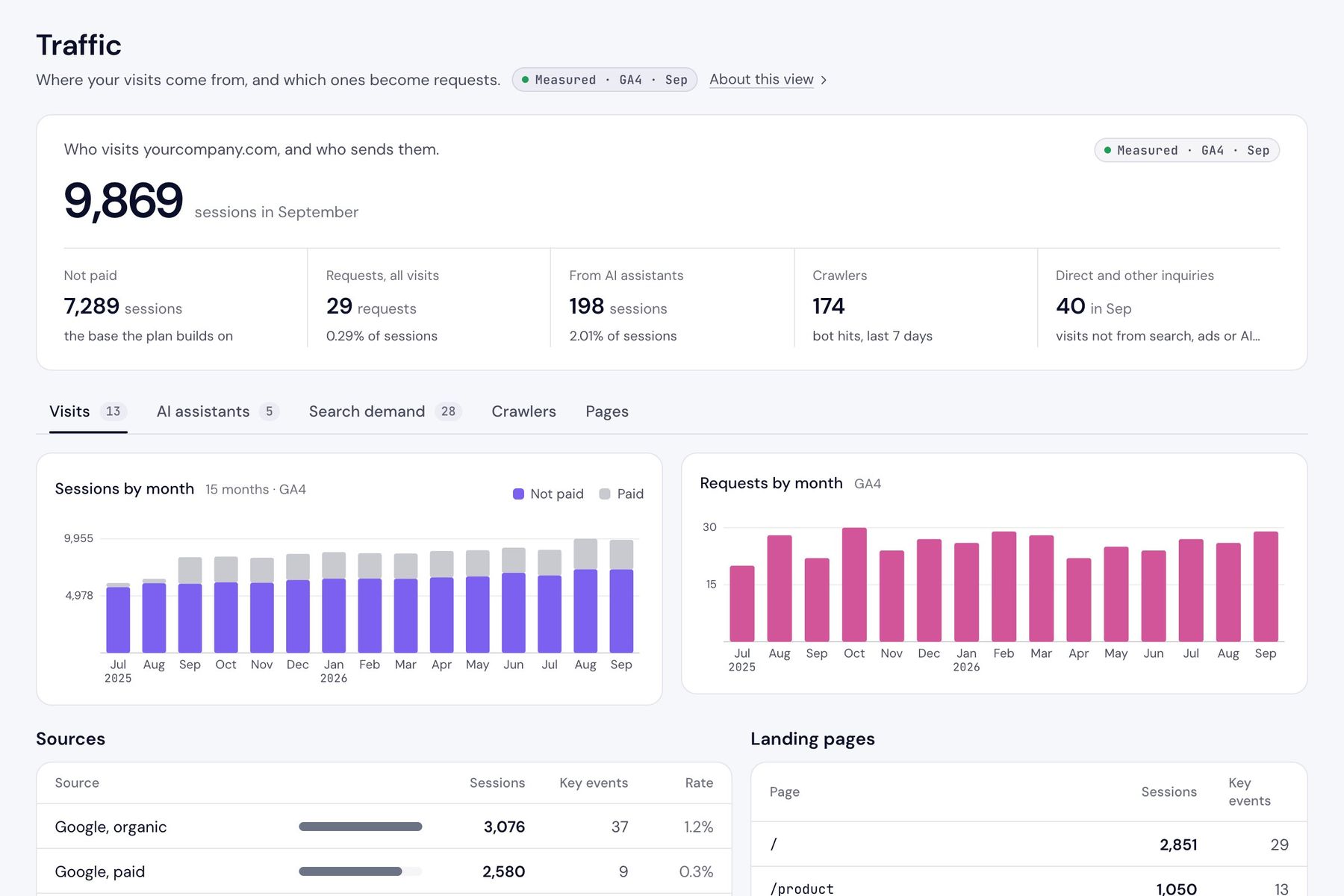
Sample workspace · Gane’s own demo data
// Permissions
Who can touch what.
There are five roles, and the same rules hold in the app and through Claude. An agency can do the work and approve it without being able to change your plan, your integrations or anything that adds cost.
Tracking, analytics, conversion setup, consent, connections and the CRM are their own work area. Point it at whoever owns them, and those actions land on that person’s list and in their Slack.
| Can | Owner | Admin | Editor | Contributor | Reviewer |
|---|---|---|---|---|---|
| Read programs and comment on them | Yes | Yes | Yes | Yes | Yes |
| Work actions and programs, and approve at a gate | Yes | Yes | Yes | Yes | No |
| Change the plan and its assumptions | Yes | Yes | Yes | No | No |
| Connect and change integrations | Yes | Yes | Yes | No | No |
| Add what Gane charges for, such as competitors and questions | Yes | Yes | Yes | No | No |
| Invite people, change roles and manage billing | Yes | Yes | No | No | No |
| Publish to your website or LinkedIn | Yes | Yes | No | No | No |
Every plan has unlimited people. The reviewer role comes with Team and Scale.
// Before security asks
The answers your security review will want.
Read-only, end to end
Gane doesn’t change anything in your ad accounts, analytics or CRM. It drafts the change, and a person on your team makes it.
Your workspace only
Each workspace’s data is kept apart in the database itself. A query that forgot its filter would return nothing, not another company’s rows.
A log nobody can edit
Changes to the plan, the connections, approvals and access are recorded with who made them and whether it was in the app or through Claude. Entries can be added, never changed or deleted.
You can see Gane’s own access
If someone at Gane opens your workspace, each visit is recorded with the pages they opened and anything they changed. Your owners can read that list in Settings.
People who leave lose access
Removing someone from the team also turns off the Claude keys they made, so nothing they set up keeps working after they’ve gone.
Sales figures without names
If you’d rather not connect the CRM yet, a short report works instead. It’s read in your browser, and only six columns reach Gane, with no names.
The details are in our privacy policy and on the security page.
// Where to look first
The parts of Gane you’ll live in.
// The plan that fits
Growth is enough to keep the stack honest.
The morning audit, the tracking checks and the actions that come from them are all on Growth. Team is for when you also want to prove what each program brought in.
Recommended
Growth, $99 a month
or $990 a year
- Google and your CRM connected read-only, and synced every morning.
- Every audit those connections allow, run every morning, with the actions ranked and assigned.
- Every role except reviewer, and Slack messages to each person.
- Server logs for one site, and Claude can read your workspace.
What Team adds
Team, $499 a month
or $4,990 a year
- Each program reports back on the contacts and opportunities it produced in your CRM.
- Promotion with tracking on every link, so each response is credited to its program.
- Reviewers who read and comment without changing anything.
- Publishing to WordPress, Webflow or HubSpot, and server logs for three sites.
Every workspace starts with 30 days of Team, free, with no card. Choose Growth or Team at the end.
Compare plans// FAQ
Questions from marketing ops.
Does Gane change anything in our ad accounts, analytics or CRM?
No. Every connection is read-only. When a fix is needed, Gane drafts it and lays out the steps, and a person on your team makes the change. The next morning’s review checks whether it worked.
How fast will Gane catch a broken form or tag?
It depends on what broke. Ads pointing at a page that no longer loads are caught after the next morning’s sync. A conversion tag that stops firing shows up within days, because Gane compares the last seven days with an average week and won’t raise an alarm over one quiet day.
Why don’t tracking actions show a pipeline figure?
While tracking is broken, the figures any estimate would rest on are wrong too. So setup, tracking and site fixes aren’t sized. They go to the top of the list as urgent instead.
Can an agency work in Gane without changing our setup?
Yes. The contributor role can work actions and programs and approve them, but it can’t change the plan, the integrations, the team or anything that adds cost. The same rules apply when they work through Claude.
See what tomorrow’s audit finds.
Enter your website and Gane will start checking it within minutes. Connect Google and your CRM when you’re ready.