
Prove · Pipeline
What marketing added to pipeline, read from your own CRM.
Gane follows each program from the first visit to the contacts, opportunities and revenue in HubSpot or Salesforce. It only counts what your CRM can show, so sales will recognize the number.
Your first recommendations within minutes. The Team plan is free for 30 days.
Sample workspace · Gane’s own demo data
// Against the plan
Your pipeline, measured against what the number needs.
The Pipeline page sets this quarter’s new opportunities against the pace your growth plan needs by today. It also shows what’s open, what was won and how your real win rate and deal size compare with the plan’s.
It counts new business only. Renewals and expansion deals are shown beside it, never added in. Gane doesn’t weight deals by stage either, because a probability applied to an amount is still a guess.
Opportunities created
24
against 23 the plan needs by today
Open now, new business
$2.6M
31 deals. Renewals are kept apart.
Conversion, last 12 months
- Win rate
- 21%Plan: 20%
- Average deal won
- $49,500Plan: $47,000
- Days to win
- 84
Sample workspace · figures are illustrative
// Program by program
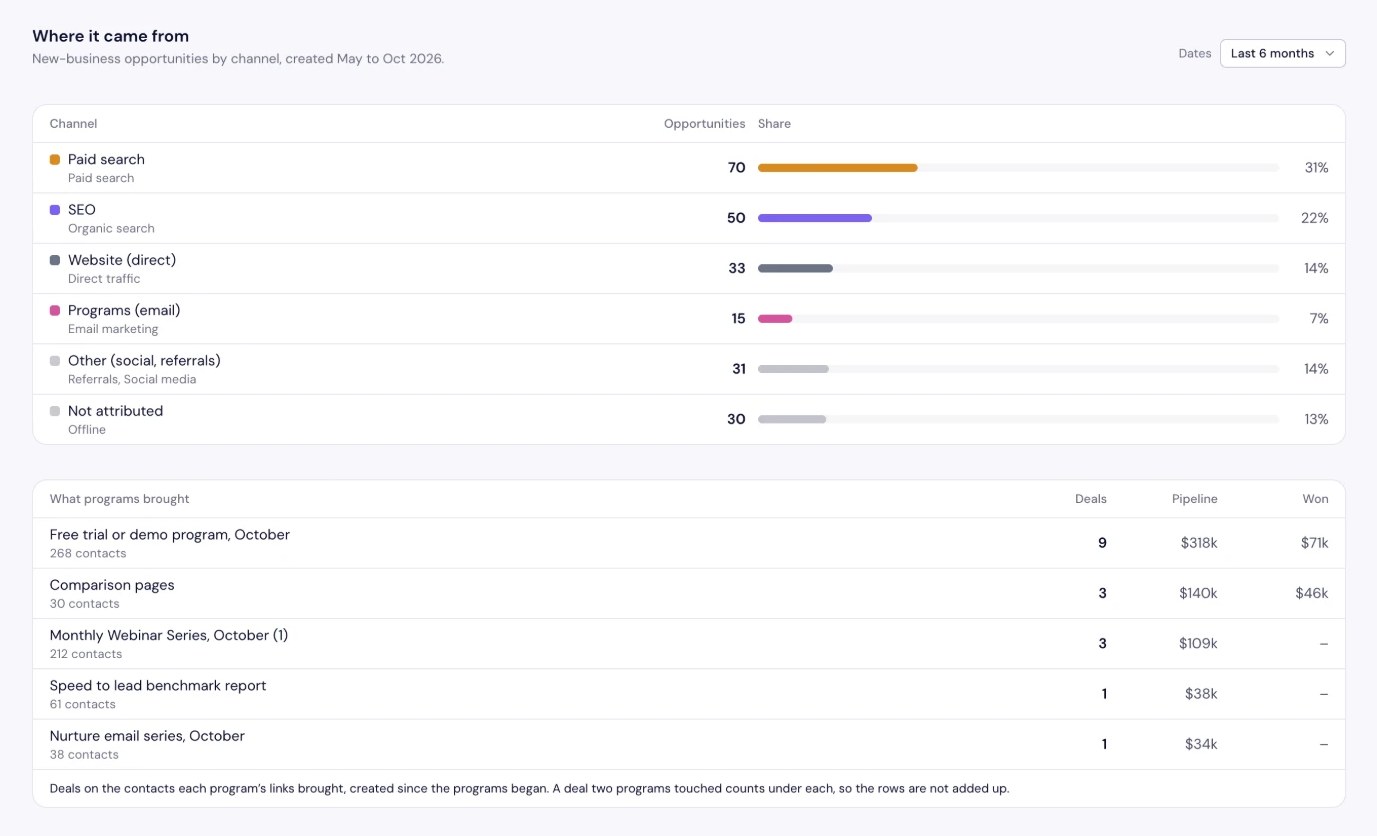
See which programs created pipeline, and which didn’t.
Every program Gane runs carries its own campaign tag. Gane finds the contacts in your CRM who came in through that tag and follows them to their deals. Open a program to see each step beside what the plan expected.
| Program | Contacts | Opportunities | Pipeline | Won |
|---|---|---|---|---|
| 310 | 4 | $188K | $47K | |
From the first visit to the deals, beside what the plan expected of a program like this one.
| ||||
| 210 | 5 | $235K | None yet | |
| 30 | 3 | $140K | $46K | |
| 49 | 2 | $94K | None yet | |
A deal counts under every program that reached someone on it, so these rows don’t add up to your total pipeline.
Sample workspace · companies are fictional and figures are illustrative
// How Gane counts
Gane never claims a deal just because it sent an email.
- 01
Only people your CRM can trace
A program’s contacts are the people whose visits carried its campaign tag, as your CRM recorded them. An email that was opened but led nowhere doesn’t count.
- 02
No splitting the credit
When two programs reached the same deal, it shows under both. Gane says so plainly instead of inventing a share for each.
- 03
New business kept apart
Renewals, expansions and upsells never inflate the new-business figures. They’re shown on a line of their own.
- 04
Every number opens its deals
Click a figure and the deals behind it load straight from your CRM, each linking back to its record there.
// Your CRM stays yours
Gane reads the figures and leaves the names where they are.
Gane only reads from HubSpot or Salesforce, once a day. It keeps counts and amounts, and it never stores who your buyers are.
What Gane keeps
- Deals created, won and lost, by month
- Amounts, stages and sources
- Win rate, average deal and days to win
- Contacts and deals counted per program
What it never stores
- Deal and company names
- Contacts and email addresses
- Owners and notes
- Which person sits on which deal
Not ready to connect?
Export a short report from any CRM. Gane reads it in your browser and sends only six columns, such as dates, stage and amount. Any other column stays on your computer, even if you export the whole deals view by mistake.
// Back into the plan
Each result makes the next plan more accurate.
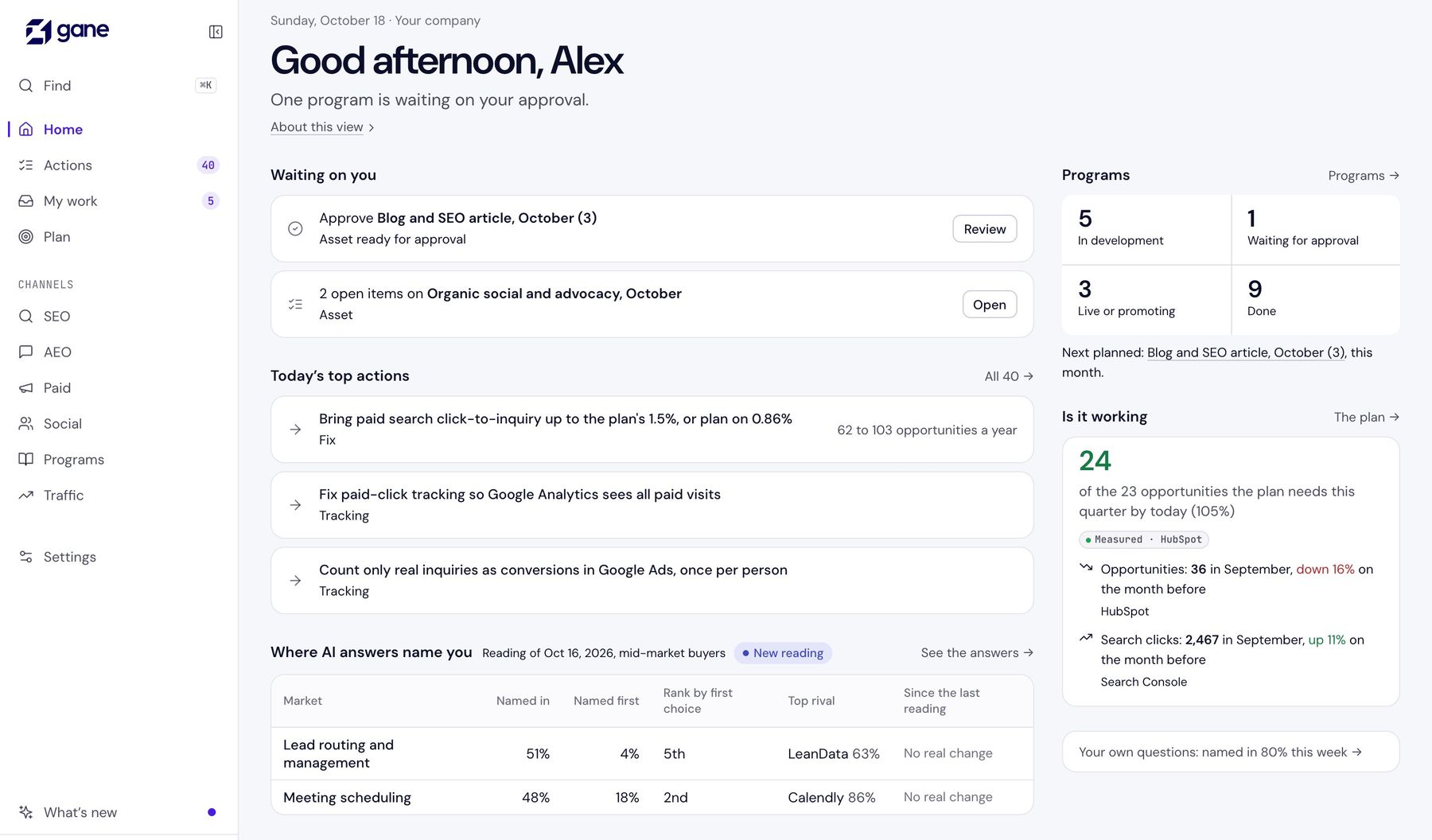
Your measured win rate and deal size replace the plan’s starting figures, and they’re labeled as measured. Once you’ve run two programs of a kind, their real responses replace Gane’s estimate for that kind.
So the programs that brought pipeline earn more room in next quarter’s mix, and the ones that didn’t stop taking up your team’s week. Home tells you each morning whether this quarter is on pace.
Sample workspace · Gane’s own demo data
// Proving the fixes
A change to your ads gets a result, not just a tick.
When someone makes a change in Google Ads, Gane sees it in the account’s change history. It then reads the result against the estimate on the action, allowing for how the rest of the account moved, and says so when it’s too soon to tell.
Read 1
First read
As soon as the changed campaigns have 30 clicks, even on day one.
Read 2
2 weeks
Against the two weeks before, weekday for weekday.
Read 3
4 weeks
Against the four weeks before.
Read 4
8 weeks
The result for changes sized in clicks or spend.
Read 5
12 weeks
For changes sized in opportunities, which take longer to show.
Each change ends with one of these, judged against the low end of its estimate.
// FAQ
Questions about pipeline.
Does Gane take credit for pipeline?
No. A program’s contacts are the people whose visits carried its campaign tag, as your CRM recorded them, and its pipeline is the deals on those contacts. Gane doesn’t claim a deal because it sent someone an email, and a deal two programs reached shows under both rather than being split.
Which CRMs does it work with?
HubSpot and Salesforce. Gane only reads from them, once a day. Without a connection you can upload a short report from any CRM, which Gane reads in your browser so only six columns and no names reach it.
Does Gane store our deals and contacts?
It keeps counts and amounts, such as deals created and won by month, stages and sources. It never stores deal names, company names, contacts, email addresses, owners or notes. When you open the deals behind a figure, they load straight from your CRM and aren’t saved.
Are renewals counted as marketing pipeline?
No. Renewal, expansion and upsell deals are kept apart from new business and shown on a line of their own, so they never inflate what marketing added.
See what your marketing is adding.
Enter your website to start. Connect your CRM when you’re ready, or upload a short report with no names.