
See · Social
LinkedIn posts that send buyers to your site.
Gane drafts LinkedIn posts for your webinars and guides in your voice, starting from what your best posts have in common. It judges them by the visits and inquiries they bring, not the likes.
Your first recommendations within minutes. The Team plan is free for 30 days.
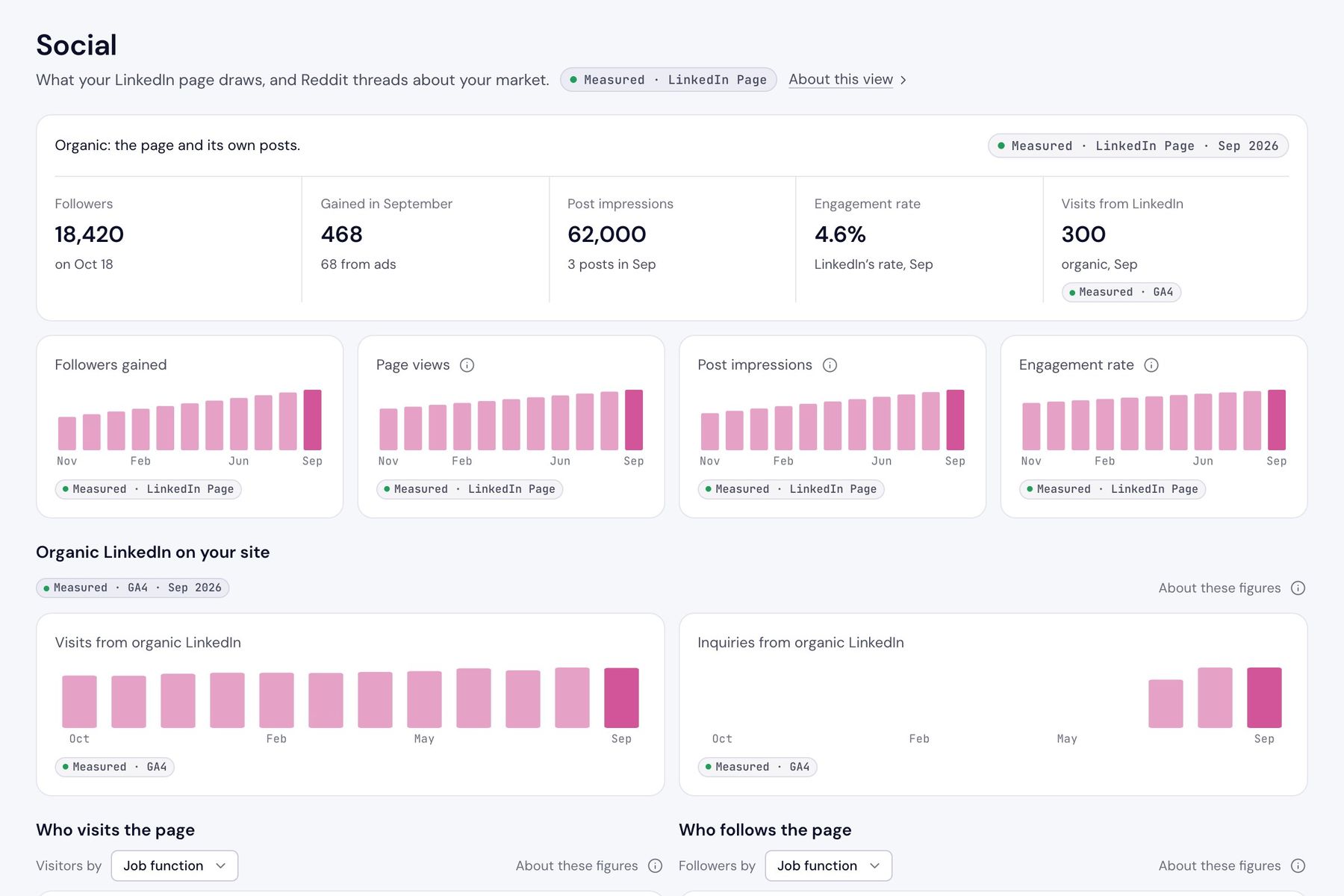
Sample workspace · Gane’s own demo data
// Start from what works
Your best posts already know what your followers stop for.
Gane reads your Company Page’s posts from the last twelve months and finds the ones people engaged with most. What they share becomes the starting point for the next posts: the subject, the first line and the format.
Every post is judged against your page’s own usual post, not a benchmark from somewhere else.
| Post | Impressions | Engagement |
|---|---|---|
| We stopped charging per seat. Here’s what happened to churn. | 14,200 | 7.9% |
| The invoice our customers’ finance teams asked us to build | 9,800 | 6.8% |
| 3 usage pricing mistakes we see every quarter | 11,400 | 6.1% |
In common: each opens with a result a customer saw, in one plain sentence.
Sample workspace · Ostrow Billing is fictional, figures are illustrative
// From brief to readout
Posts drafted for you, and approved by someone you name.
A webinar or a guide comes with LinkedIn posts in its promotion, and a set of posts can also run as a program of its own. Step through how one moves from a brief to a readout.
// An image for every post
Images in your brand, with nothing made up.
Gane can make a title card, a figure card or a quote card for a post, in your site’s colors and fonts. Text is always kept readable against the background.
A figure only appears if the program states it, and a quote only if it’s a sentence from the draft, word for word. You can change any line before you save it.
Usage pricing without the invoice surprises
Ostrow Billing
31%
less churn in the year after dropping per-seat pricing
Source: the guide’s customer survey
Get the meter right and the invoice wrong, and finance will notice first.
Ostrow Billing
Sample cards · Ostrow Billing is fictional
// What counts
Likes are easy to grow. Gane counts what reaches your site.
Gane reads Google Analytics for the visits that come from organic LinkedIn and the inquiries those visitors send. That’s the number your plan cares about, so it’s the one Social leads with.
Posts are matched to their programs by the link they carry. Each program shows its posts beside the LinkedIn visits that landed on its page.
Organic LinkedIn on your site
| Month | Visits | Inquiries |
|---|---|---|
| May | 180 | 4 |
| Jun | 210 | 5 |
| Jul | 190 | 3 |
| Aug | 260 | 7 |
| Sep | 300 | 9 |
| Oct | 340 | 11 |
Sample workspace · figures are illustrative
// Who’s looking
See whether the right people are paying attention.
Tell the plan who you sell to, and Social marks the visitors and followers who fit. When posts are seen widely and then passed over, Gane says so and drafts the next ones differently.
Who visits the page, by job function
Marked where it matches your buyer profile
- Finance (in your buyer profile)34%
- Engineering22%
- Operations (in your buyer profile)17%
- Sales15%
- Product management (in your buyer profile)12%
63% of page views are from your buyer profile
Sample workspace · figures are illustrative
Found this morning
Social3 of the page’s 11 posts in the last 90 days were seen as widely as its usual post, and people engaged with them at under half its usual rate.
Reach wasn’t the problem, the posts were. The page’s best posts show what its followers stop for, and the next posts should start from those.
Sample workspace · figures are illustrative
// FAQ
Questions about social.
Does Gane post to LinkedIn for us?
Only when you ask it to. An owner or admin can turn on posting to your Company Page, and then a person presses Publish or Schedule for each approved post. Otherwise you copy the posts into LinkedIn yourself.
Where do the drafts come from?
From the program’s brief and draft, your company’s voice, and what your page’s best posts of the last twelve months have in common: the subject, the first line and the format.
How does Gane know which posts brought visits?
Each drafted post’s link is tagged, so Google Analytics can tell the visit came from LinkedIn. Gane counts visits and inquiries from organic LinkedIn, and shows each program’s posts beside the LinkedIn visits that landed on its page.
What does Gane read from LinkedIn?
Your Company Page’s followers, page views, posts and their statistics, read-only. It doesn’t read or keep anything about the people who reacted or commented.
See what your LinkedIn page sends you.
Enter your website, and Gane will start your plan within minutes. Connect your Company Page when you’re ready.
Brief
Optional. A few lines on what these posts should do differently, taken from what the page’s best posts do. You can skip straight to the posts.
Sample workspace · Ostrow Billing is fictional